17. GCP - C#
Quote
“Everything fails all the time, so plan for failure and nothing fails.”
— Werner Vogels, CTO of Amazon
Summary
Authentication & Setup
- ADC chain (
GoogleCredential.GetApplicationDefault()) auto-selects credentials: env var →gcloud auth→ metadata server. All SDK clients share the same chain.- NuGet packages:
Google.Cloud.BigQuery.V2,Google.Cloud.Storage.V1,Google.Cloud.PubSub.V1,Google.Cloud.Firestore,Google.Cloud.SecretManager.V1,Google.Cloud.Monitoring.V3.- On .NET 10 Interactive, suppress CS1701/CS1702 via reflection on
_scriptOptions.WarningLevel.Cloud Storage (GCS) — Bronze Layer
StorageClient.Create()authenticates via ADC; thread-safe, create once and reuse.- Core ops:
ListObjects(bucket, prefix)(lazy paginated),UploadObject(bucket, name, type, stream),DownloadObject(bucket, name, stream),DeleteObject(bucket, name).BigQuery — Silver + Gold Layers
BigQueryClient.Create(projectId)wraps the BigQuery REST API.ExecuteQuery(sql, null)returnsIEnumerable<BigQueryRow>; column values accessed by name asobject.- For long-running jobs use
CreateQueryJob;ExecuteQueryis synchronous and blocks.Pub/Sub — Event Bus
PublisherClient.CreateAsync(topicName)creates a batching async publisher; callShutdownAsync()to flush.SubscriberServiceApiClient.Create()+.Pull(subName, maxMessages)for synchronous batch pull; acknowledge via.Acknowledge(subName, ackIds).Firestore — Real-Time Layer
FirestoreDb.Create(projectId)+collection.Document(id).SetAsync(data)upserts documents atomically.- On .NET 10 Interactive: SDK reads and
Listen()fail due toMicrosoft.Bcl.AsyncInterfacesconflict — use Firestore REST API with OAuth2 bearer token instead.- Polling pattern: fetch full collection on interval, compare prices to detect NEW / CHANGED / UNCHANGED states.
Secret Manager — Credential Vault
SecretManagerServiceClient.Create()+AccessSecretVersion("projects/{p}/secrets/{id}/versions/latest")reads the active secret version.ListSecretsreturns a lazy paginated enumerable ofSecretobjects; use.SecretName.SecretIdfor the plain name.Cloud Monitoring — Observability
MetricServiceClient.Create()+CreateTimeSeries(projectName, timeSeries[])writes custom metrics undercustom.googleapis.com/prefix.- Wrap writes in a retry loop — Cloud Monitoring can return transient
InternalgRPC errors.
Glossary
ADC (Application Default Credentials)
GoogleCredential.GetApplicationDefault()— discovers credentials automatically:GOOGLE_APPLICATION_CREDENTIALSenv var →gcloud auth application-default login→ GCE/Cloud Run metadata server.- All
Google.Cloud.*SDK clients use this chain; no explicit credential wiring is needed in GCP-hosted environments.- A bad
GOOGLE_APPLICATION_CREDENTIALSpath usually fails on the first API call rather than at process startup.
StorageClient
- The
Google.Cloud.Storage.V1client for all Cloud Storage object operations: list, upload, download, delete.- Thread-safe; create a single instance per process and reuse it — do not instantiate per-request.
ListObjectsreturns anIEnumerablethat pages through GCS results automatically instead of loading the full object set into memory.
BigQueryClient
- The
Google.Cloud.BigQuery.V2client for running SQL queries, loading data from GCS, and managing tables.ExecuteQuery(sql, null)is synchronous and blocks the calling thread until results are ready.- For queries expected to run more than a few seconds, use
CreateQueryJoband poll for completion instead ofExecuteQuery.
PublisherClient
- The
Google.Cloud.PubSub.V1async publisher created withawait PublisherClient.CreateAsync(topicName).- Buffers messages internally in batches for throughput; unflushed messages are lost if the process exits without calling
ShutdownAsync.- Always call
await publisher.ShutdownAsync(TimeSpan.FromSeconds(15))in afinallyblock to avoid message loss on crash or graceful shutdown.
SubscriberServiceApiClient
- The synchronous batch-pull client for Pub/Sub, suited for scripts and notebooks.
- Messages must be explicitly acknowledged via
.Acknowledge(subName, ackIds)— unacknowledged messages are redelivered after the ack deadline.- In long-running services, use the streaming
SubscriberClientinstead because it manages ack deadlines automatically and delivers messages via a callback.
FirestoreDb
- The
Google.Cloud.Firestoreclient for document-oriented operations:SetAsync(upsert),UpdateAsync(partial merge),DeleteAsync.- Document limit: 1 MB per document; write throughput limit: 1 write/sec per document (500 writes/sec across distinct documents).
- On .NET 10 Interactive, SDK reads (
GetSnapshotAsync) and real-time listeners (Listen) can fail because of aMicrosoft.Bcl.AsyncInterfacesconflict; use the Firestore REST API as the workaround.
SecretManagerServiceClient
- The
Google.Cloud.SecretManager.V1client for reading, listing, and managing secrets at runtime.- Access the current active version with the path
projects/{project}/secrets/{name}/versions/latest; the payload is aByteString, decode with.ToStringUtf8().- Never log the decoded secret payload; mask or omit it in any output to avoid leaking credentials into stdout or Cloud Logging.
MetricServiceClient
- The
Google.Cloud.Monitoring.V3client for writing custom time-series metrics to Cloud Monitoring.- Metric types must use the
custom.googleapis.com/prefix; data appears in Metrics Explorer within ~60 seconds.CreateTimeSeriescan return transientGrpc.Core.StatusCode.Internalerrors, so wrap writes in a short exponential-backoff retry loop.
TopicName/SubscriptionName
- Typed resource-name wrappers in
Google.Cloud.PubSub.V1that encodeprojects/{project}/topics/{topic}andprojects/{project}/subscriptions/{sub}.- Prefer these over raw strings — they prevent malformed resource-path errors and provide
.ProjectId/.TopicIdaccessors.- GCP APIs use hierarchical resource paths such as
projects/*/topics/*, and the SDK name types parse and validate that format for you.
How the Pipeline Works
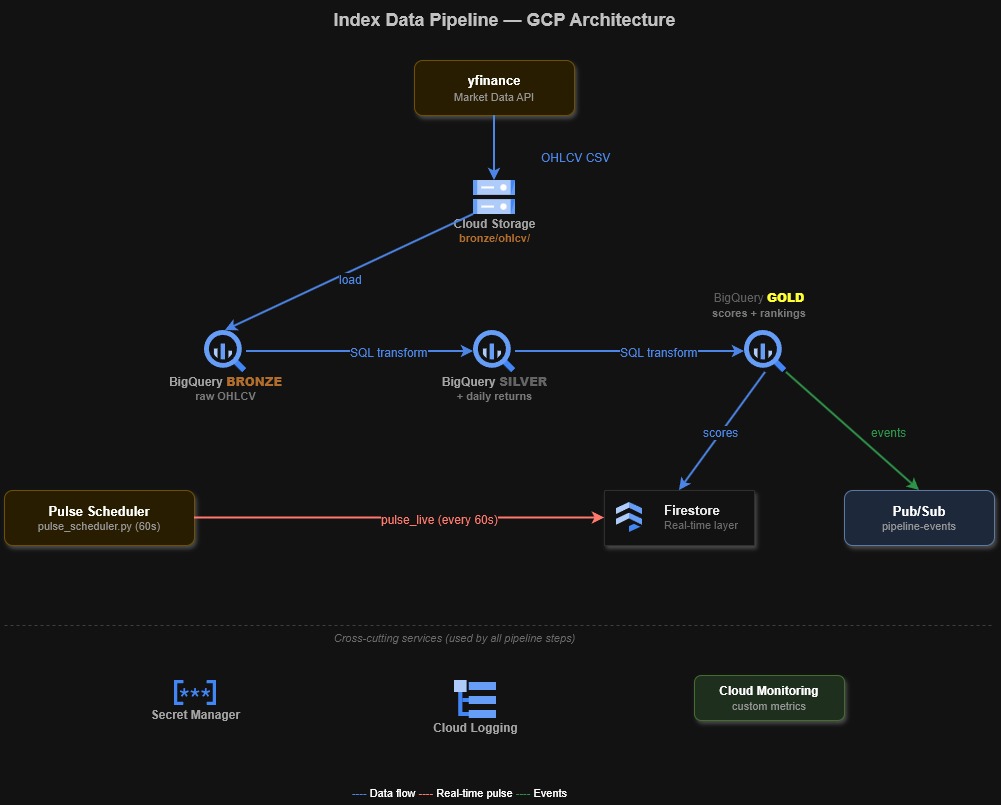
The index ETL pipeline moves market data through three layers — Bronze (raw), Silver (cleaned), Gold (scored) — using GCP-managed services at each stage. Secret Manager and Cloud Monitoring are cross-cutting concerns that apply throughout.
This diagram maps the Bronze, Silver, Gold, and downstream service flow.
flowchart TD
    SRC["yfinance<br/>OHLCV data"] -->|CSV| GCS["GCS<br/>Bronze Layer"]
    GCS -->|load job| BQ_B["BigQuery<br/>bronze_ohlcv"]
    BQ_B -->|window fns| BQ_S["BigQuery<br/>silver_ohlcv"]
    BQ_S -->|scoring SQL| BQ_G["BigQuery<br/>gold_scores"]
    BQ_G -->|upsert| FS["Firestore<br/>scores_latest"]
    BQ_G -->|publish| PS["Pub/Sub<br/>pipeline-events"]
    FS -->|on_snapshot| DASH["Dashboard<br/>live updates"]
    PS -->|subscribe| DASH
    SM["Secret Manager"] -.->|credentials| SRC
    SM -.->|credentials| GCS
    MON["Cloud Monitoring<br/>logs + metrics"] -.->|observe| BQ_G

    style SRC fill:#292e42,stroke:#7aa2f7,color:#c0caf5
    style GCS fill:#292e42,stroke:#7dcfff,color:#c0caf5
    style BQ_B fill:#1a1b26,stroke:#bb9af7,color:#c0caf5
    style BQ_S fill:#1a1b26,stroke:#bb9af7,color:#c0caf5
    style BQ_G fill:#1a1b26,stroke:#bb9af7,color:#c0caf5
    style FS fill:#292e42,stroke:#e0af68,color:#c0caf5
    style PS fill:#292e42,stroke:#9ece6a,color:#c0caf5
    style DASH fill:#292e42,stroke:#f7768e,color:#c0caf5
    style SM fill:#24283b,stroke:#565f89,color:#c0caf5
    style MON fill:#24283b,stroke:#565f89,color:#c0caf5
Topics Covered
- Authentication & Setup
- Cloud Storage (GCS)
- BigQuery
- Pub/Sub
- Firestore (+ real-time listeners)
- Secret Manager
- Cloud Monitoring
Authentication & Setup
Pipeline role: The foundation — every GCP service call is authenticated via a service account key. The key file (JSON) is set via GOOGLE_APPLICATION_CREDENTIALS env var. All Google.Cloud.* libraries auto-detect it via the ADC (Application Default Credentials) chain: env var → gcloud auth → metadata server.
NuGet packages and warning suppression
Run this cell once before any others. It installs all required GCP SDK NuGet packages and suppresses CS1701/CS1702 assembly version warnings — these appear because packages targeting .NET 8/9 report version mismatches on .NET 10, but are harmless. The warning suppression uses reflection to set the internal _scriptOptions.WarningLevel to 0 on the .NET Interactive kernel.
This cell loads the Google Cloud packages and suppresses interactive warning noise.
using System.Reflection;
using Microsoft.DotNet.Interactive;
using Microsoft.DotNet.Interactive.CSharp;

#r "nuget: Google.Cloud.BigQuery.V2"
#r "nuget: Google.Cloud.Firestore"
#r "nuget: Google.Cloud.Monitoring.V3"
#r "nuget: Google.Cloud.PubSub.V1"
#r "nuget: Google.Cloud.SecretManager.V1"
#r "nuget: Google.Cloud.Storage.V1"
#r "nuget: Microsoft.Bcl.AsyncInterfaces"
using Google.Api;
using Google.Apis.Auth.OAuth2;
using Google.Cloud.BigQuery.V2;
using Google.Cloud.Firestore;
using Google.Cloud.Monitoring.V3;
using Google.Cloud.PubSub.V1;
using Google.Cloud.SecretManager.V1;
using Google.Cloud.Storage.V1;
using Google.Protobuf.WellKnownTypes;
using Google.Protobuf;
using System.IO;
using System.Net.Http.Headers;
using System.Net.Http;
using System.Text.Json;
using System.Text;
var csharpKernel = (CSharpKernel)Kernel.Root.FindKernelByName("csharp");
var optionsField = typeof(CSharpKernel).GetField("_scriptOptions",
    BindingFlags.NonPublic | BindingFlags.Instance);

var scriptOptions = optionsField.GetValue(csharpKernel);
var withWarningLevel = scriptOptions.GetType().GetMethod("WithWarningLevel");
var newOptions = withWarningLevel.Invoke(scriptOptions, new object[] { 0 });
optionsField.SetValue(csharpKernel, newOptions);
WarningLevel set to 0 — CS1701/CS1702 warnings suppressed.Connect and verify credentials
GoogleCredential.GetApplicationDefault() reads the ADC chain and returns whichever credential is available: a service account key (when GOOGLE_APPLICATION_CREDENTIALS is set), user credentials from gcloud auth application-default login, or the GCE metadata server inside Cloud Run / GKE. Checking .UnderlyingCredential.GetType().Name confirms which source was used.
This snippet prints the resolved ADC credential type plus the core project identifiers used later in the note.
var projectId = "index-lab-2";
var region = "europe-west1";
var bucketName = $"{projectId}-index-data";
var bqDataset = "index_data";

var creds = GoogleCredential.GetApplicationDefault();
Console.WriteLine(creds.UnderlyingCredential.GetType().Name);  // credential type
Console.WriteLine(projectId);   // project
Console.WriteLine(bucketName);  // bucket
UserCredential
index-lab-2
index-lab-2-index-dataCloud Storage (GCS)
Pipeline role: BRONZE LAYER — Raw data lands here first. yfinance OHLCV data is fetched and uploaded as CSV to gs://bucket/bronze/ohlcv/. GCS is the data lake — immutable, versioned, cheap storage. Downstream services (BigQuery, pipelines) read from here. For the CLI equivalents of these operations (gsutil, gcloud storage, lifecycle policies), see gcs-object-operations.
StorageClient.Create() authenticates via the ADC chain and returns a client scoped to the project. All object operations go through this single client instance.
Object operations
Create the GCS client
StorageClient.Create() reads credentials from the ADC chain (same as GoogleCredential.GetApplicationDefault()). The client is thread-safe and should be reused across operations.
This snippet creates a reusable StorageClient instance.
var storageClient = StorageClient.Create();[no visible output]List objects in a prefix
ListObjects(bucket, prefix) returns a lazy IEnumerable<Google.Apis.Storage.v1.Data.Object> — it pages through results automatically. Prefixes simulate folder hierarchy in GCS’s flat namespace.
This snippet enumerates the bronze/ prefix and prints each object name with its size.
foreach (var obj in storageClient.ListObjects(bucketName, "bronze/"))
    Console.WriteLine($"  {obj.Name,-50} {obj.Size,10:N0} bytes");
bronze/.keep 0 bytes
bronze/ohlcv/20260322_ohlcv.csv 35,426 bytesUpload an object from a stream
UploadObject(bucket, objectName, contentType, stream) writes a stream to GCS. Passing a MemoryStream avoids writing a temp file. The object name becomes the full blob path including any prefix.
This snippet uploads a small in-memory CSV file into the Bronze layer.
var csvContent = "symbol,date,close\nASML.AS,2026-03-20,685.40\nMC.PA,2026-03-20,890.20";
var csvBytes = Encoding.UTF8.GetBytes(csvContent);
var blobName = $"bronze/ohlcv/{DateTime.Now:yyyyMMdd}_test_cs.csv";

using var stream = new MemoryStream(csvBytes);
storageClient.UploadObject(bucketName, blobName, "text/csv", stream);
Console.WriteLine($"  Uploaded: gs://{bucketName}/{blobName} ({csvBytes.Length} bytes)");
Uploaded: gs://index-lab-2-index-data/bronze/ohlcv/20260322_test_cs.csv (67 bytes)Download an object to a stream
DownloadObject(bucket, objectName, stream) writes the blob content into any writable Stream. Reading from a MemoryStream after download gives you the raw bytes without touching the filesystem.
This snippet downloads the uploaded CSV blob into memory and prints its lines.
using var ms = new MemoryStream();
storageClient.DownloadObject(bucketName, blobName, ms);
var downloaded = Encoding.UTF8.GetString(ms.ToArray());
Console.WriteLine($"  Downloaded ({ms.Length} bytes):");
foreach (var line in downloaded.Split('\n'))
    Console.WriteLine($"    {line}");
Downloaded (67 bytes):
symbol,date,close
ASML.AS,2026-03-20,685.40
MC.PA,2026-03-20,890.20Delete an object
DeleteObject(bucket, objectName) removes a single blob. In production, bronze-layer data is kept immutable — only delete test or staging objects.
This snippet deletes the temporary test object from Cloud Storage.
storageClient.DeleteObject(bucketName, blobName);
Console.WriteLine($"  Deleted: {blobName}");
Deleted: bronze/ohlcv/20260322_test_cs.csvBigQuery
Pipeline role: SILVER + GOLD LAYERS — The analytics engine. Bronze data loaded from GCS is queried with SQL window functions to produce daily returns (silver) and composite momentum scores (gold). BigQuery is serverless — no cluster to manage, queries scale automatically.
BigQueryClient.Create(projectId) authenticates via ADC and targets the specified project. All query and load operations use this client. The Python equivalent is bigquery.Client(project=PROJECT_ID).
This page shows read-only BigQuery queries
The examples read from tables pre-populated by the Python pipeline run. In a production C# service, use
bqClient.CreateLoadJob()andbqClient.CreateQueryJob()for the full ETL flow.
Execute SQL queries
Create the BigQuery client
BigQueryClient.Create(projectId) returns a client that wraps the BigQuery REST API. It authenticates via the same ADC chain as all other Google Cloud clients.
This snippet creates a reusable BigQueryClient bound to the target project.
var bqClient = BigQueryClient.Create(projectId);[no visible output]Query the bronze OHLCV table
ExecuteQuery(sql, parameters) runs a synchronous query and returns a BigQueryResults — an IEnumerable<BigQueryRow> that pages results automatically. Row values are accessed by column name as object and must be cast or formatted explicitly.
This query reads recent rows from the Bronze OHLCV table and formats them as a compact preview.
var sql = $@"
    SELECT symbol, date, ROUND(close, 2) AS close, volume
    FROM `{projectId}.{bqDataset}.bronze_ohlcv`
    ORDER BY date DESC, symbol
    LIMIT 10";

var results = bqClient.ExecuteQuery(sql, parameters: null);
Console.WriteLine($"{"Symbol",-10} {"Date",-12} {"Close",10} {"Volume",14}");
Console.WriteLine(new string('─', 50));
foreach (var row in results)
    Console.WriteLine($"  {row["symbol"],-10} {row["date"],-12} {row["close"],10} {row["volume"],14}");
Symbol Date Close Volume
──────────────────────────────────────────────────
ASML.AS 20-Mar-26 0:00:00 1128.2 2685518
MC.PA 20-Mar-26 0:00:00 457.95 1359678
SAP.DE 20-Mar-26 0:00:00 153.82 9371857
SIE.DE 20-Mar-26 0:00:00 203.75 3770741
TTE.PA 20-Mar-26 0:00:00 76.96 13084381
ASML.AS 19-Mar-26 0:00:00 1168.6 1057331
MC.PA 19-Mar-26 0:00:00 460.25 772011
SAP.DE 19-Mar-26 0:00:00 160 3819500
SIE.DE 19-Mar-26 0:00:00 210.3 2407185
TTE.PA 19-Mar-26 0:00:00 78.59 13162837Query the gold scores table
The gold layer holds one row per ticker with pre-computed momentum scores and composite rankings. This query reads the final pipeline output — the same data written to Firestore for dashboard access.
This query reads the Gold ranking output and prints the composite order for each ticker.
var goldSql = $@"
    SELECT symbol, ROUND(close, 2) AS close,
        ROUND(momentum_score * 100, 2) AS momentum_pct,
        ROUND(volume_score, 2) AS vol_ratio,
        composite_rank
    FROM `{projectId}.{bqDataset}.gold_scores`
    ORDER BY composite_rank";

foreach (var row in bqClient.ExecuteQuery(goldSql, parameters: null))
    Console.WriteLine($"  {row["composite_rank"],2}. {row["symbol"],-10} close={row["close"],8}  momentum={row["momentum_pct"],+6}%  vol={row["vol_ratio"]}");
1. TTE.PA close= 76.96 momentum= 12.82% vol=1.61
2. ASML.AS close= 1128.2 momentum= -6.15% vol=3.01
3. SAP.DE close= 153.82 momentum= -8.7% vol=2.84
4. MC.PA close= 457.95 momentum= -10.9% vol=1.97
5. SIE.DE close= 203.75 momentum=-13.24% vol=2.33Pub/Sub
Pipeline role: EVENT BUS — Decouples pipeline steps. After each ETL stage completes, a message is published (“ohlcv_loaded”, “silver_computed”, “gold_scored”). Downstream consumers (dashboards, alerting, other pipelines) subscribe to these events. Enables async, event-driven architecture. For topic/subscription management and dead-letter configuration via gcloud, see pubsub-messaging.
Messages are published to topics (named channels) and consumed via subscriptions (pull or push). Each message carries a ByteString payload plus optional string attributes. Messages must be acknowledged after processing — unacknowledged messages are redelivered after the ack deadline.
Publish and pull messages
Publish pipeline events
PublisherClient.CreateAsync(topicName) creates a batching, async publisher that buffers messages and sends them in batches for throughput. Each PublishAsync call returns the server-assigned messageId. Call ShutdownAsync to flush pending messages before the client goes out of scope.
This snippet publishes three pipeline events and flushes the buffered publisher before exit.
var topicName = TopicName.FromProjectTopic(projectId, "pipeline-events");
var subName = SubscriptionName.FromProjectSubscription(projectId, "pipeline-events-sub");

var publisher = await PublisherClient.CreateAsync(topicName);

var events = new[] { "ohlcv_loaded_cs", "silver_computed_cs", "gold_scored_cs" };
foreach (var evt in events)
{
    var msgId = await publisher.PublishAsync(new PubsubMessage
    {
        Data = ByteString.CopyFromUtf8($"{{\"event\": \"{evt}\", \"source\": \"csharp\"}}"),
        Attributes = { ["pipeline"] = "index_etl" }
    });
    Console.WriteLine($"  Published: {evt} (msg_id={msgId})");
}
await publisher.ShutdownAsync(TimeSpan.FromSeconds(5));
await Task.Delay(2000);  // allow messages to propagate
Published: ohlcv_loaded_cs (msg_id=18105610464022399)
Published: silver_computed_cs (msg_id=18105731398234272)
Published: gold_scored_cs (msg_id=18105493728682506)Pull and acknowledge messages
SubscriberServiceApiClient performs synchronous batch pulls — suited for scripts and notebooks. In production services use SubscriberClient for streaming pull, which manages ack deadlines automatically. Messages must be acknowledged via their AckId or they will be redelivered.
This snippet pulls the published messages synchronously and acknowledges them in one batch.
var subscriber = SubscriberServiceApiClient.Create();
var response = subscriber.Pull(subName, maxMessages: 10);

var ackIds = new List<string>();
foreach (var msg in response.ReceivedMessages)
{
    var data = msg.Message.Data.ToStringUtf8();
    Console.WriteLine($"  {msg.Message.PublishTime:HH:mm:ss} | {data}");
    ackIds.Add(msg.AckId);
}

if (ackIds.Count > 0)
{
    subscriber.Acknowledge(subName, ackIds);
    Console.WriteLine($"\n  Acknowledged {ackIds.Count} messages");
}
13:37:42 | {"event": "ohlcv_loaded_cs", "source": "csharp"}
13:37:42 | {"event": "silver_computed_cs", "source": "csharp"}
13:37:42 | {"event": "gold_scored_cs", "source": "csharp"}
Acknowledged 3 messagesFirestore
Pipeline role: REAL-TIME LAYER — The live dashboard backend. Gold scores and pulse snapshots are written here for instant access. Firestore supports real-time listeners — dashboards get push notifications when data changes, without polling. Think of it as the “hot” layer vs BigQuery’s “warm” layer.
Data is organized into collections (groups of documents) containing documents (JSON-like records). FirestoreDb.Create(projectId) returns the SDK client. SetAsync upserts a document — it creates or overwrites the entire document atomically.
.NET 10 SDK read and listener incompatibility
FirestoreDbSDK reads (.GetSnapshotAsync()) and real-time listeners (.Listen()) hit a missing assembly exception on .NET 10 Interactive due to aMicrosoft.Bcl.AsyncInterfacesversion conflict. Writes viaSetAsyncandDeleteAsyncwork correctly.
Workaround: Firestore REST API for reads
Use the Firestore REST API directly with an OAuth2 bearer token obtained via
GoogleCredential.GetApplicationDefault(). SDK reads and listeners work correctly in .NET 8/9 projects — this workaround is only needed in .NET Interactive on .NET 10.
Write and read documents
Write documents with SetAsync
SetAsync(data) upserts the document — if it exists, all fields are replaced. Use UpdateAsync to merge only specific fields. Timestamp.GetCurrentTimestamp() writes a server-side Firestore timestamp.
This snippet upserts three score documents into Firestore with a server timestamp.
var firestoreDb = FirestoreDb.Create(projectId);

var scores = new[]
{
    new { Symbol = "ASML.AS", Close = 685.40, Rank = 1 },
    new { Symbol = "MC.PA",   Close = 890.20, Rank = 2 },
    new { Symbol = "SAP.DE",  Close = 245.80, Rank = 3 },
};

foreach (var s in scores)
{
    var docRef = firestoreDb.Collection("scores_latest_cs").Document(s.Symbol);
    await docRef.SetAsync(new Dictionary<string, object>
    {
        ["symbol"] = s.Symbol,
        ["close"] = s.Close,
        ["composite_rank"] = s.Rank,
        ["updated_at"] = Timestamp.GetCurrentTimestamp(),
    });
}
Console.WriteLine($"  Written {scores.Length} documents");
Written 3 documentsRead a collection via the REST API
Obtain an OAuth2 token scoped to datastore and call the Firestore REST endpoint directly. The response is standard JSON — parse with JsonDocument and navigate the typed-value structure (doubleValue, stringValue, etc.) that Firestore REST uses.
This snippet reads the pulse_live collection through the REST API and prints the decoded values.
var credential = Google.Apis.Auth.OAuth2.GoogleCredential.GetApplicationDefault()
    .CreateScoped("https://www.googleapis.com/auth/datastore");
var token = await credential.UnderlyingCredential.GetAccessTokenForRequestAsync();

var httpClient = new HttpClient();
httpClient.DefaultRequestHeaders.Authorization = new AuthenticationHeaderValue("Bearer", token);

var restUrl = $"https://firestore.googleapis.com/v1/projects/{projectId}/databases/(default)/documents/pulse_live";
var response = await httpClient.GetAsync(restUrl);
var jsonDoc = JsonDocument.Parse(await response.Content.ReadAsStringAsync());

if (!jsonDoc.RootElement.TryGetProperty("documents", out var documents))
{
    Console.WriteLine("  No pulse data yet. Run: python pulse_scheduler.py --once");
}
else
{
    foreach (var fdoc in documents.EnumerateArray())
    {
        var symbol = fdoc.GetProperty("name").GetString().Split("/")[^1];
        var fields = fdoc.GetProperty("fields");

        var price = fields.TryGetProperty("current_price", out var pv)
            ? pv.GetProperty("doubleValue").GetDouble().ToString("F2") : "N/A";
        var chgPct = fields.TryGetProperty("price_change_pct", out var cv)
            ? (double?)cv.GetProperty("doubleValue").GetDouble() : null;
        var chgStr = chgPct.HasValue ? string.Format("{0:+0.00}%", chgPct.Value) : "N/A";

        Console.WriteLine($"  {symbol,-10}  price={price,10}  change={chgStr,8}");
    }
}

foreach (var s in scores)
    await firestoreDb.Collection("scores_latest_cs").Document(s.Symbol).DeleteAsync();
Console.WriteLine($"\n  Cleaned up {scores.Length} score documents");
ASML.AS price= 1128.20 change= -3.46%
MC.PA price= 457.95 change= -0.50%
SAP.DE price= 153.82 change= -3.86%
SIE.DE price= 203.75 change= -3.11%
TTE.PA price= 76.96 change= -2.07%
Cleaned up 3 score documentsPoll for live updates via REST
Poll pulse_live on an interval
Because Listen() is unavailable on .NET 10 Interactive, polling simulates real-time awareness. Each poll fetches the full collection and compares prices against the previous poll to detect NEW / CHANGED / UNCHANGED states. In a .NET 8/9 project, replace this with firestoreDb.Collection("pulse_live").Listen(snapshot => { ... }) for true push delivery.
This snippet polls Firestore repeatedly and classifies each ticker as NEW, CHANGED, or UNCHANGED.
var cred = Google.Apis.Auth.OAuth2.GoogleCredential.GetApplicationDefault()
    .CreateScoped("https://www.googleapis.com/auth/datastore");
var accessToken = await cred.UnderlyingCredential.GetAccessTokenForRequestAsync();

var client = new HttpClient();
client.DefaultRequestHeaders.Authorization = new AuthenticationHeaderValue("Bearer", accessToken);
var apiUrl = $"https://firestore.googleapis.com/v1/projects/{projectId}/databases/(default)/documents/pulse_live";

Console.WriteLine("Polling pulse_live every 30s for 2 minutes...\n");
var previousPrices = new Dictionary<string, string>();
var pollCount = 0;

for (int i = 0; i < 4; i++)
{
    pollCount++;
    var parsed = JsonDocument.Parse(await (await client.GetAsync(apiUrl)).Content.ReadAsStringAsync());
    Console.WriteLine($"[Poll #{pollCount} at {DateTime.Now:HH:mm:ss}]");

    if (parsed.RootElement.TryGetProperty("documents", out var docs))
    {
        foreach (var fdoc in docs.EnumerateArray())
        {
            var sym = fdoc.GetProperty("name").GetString().Split("/")[^1];
            var fields = fdoc.GetProperty("fields");

            var priceStr = fields.TryGetProperty("current_price", out var pv)
                ? pv.GetProperty("doubleValue").GetDouble().ToString("F2") : "N/A";
            var change = fields.TryGetProperty("price_change_pct", out var cv)
                ? (double?)cv.GetProperty("doubleValue").GetDouble() : null;

            var status = !previousPrices.ContainsKey(sym) ? "NEW"
                : previousPrices[sym] != priceStr ? "CHANGED" : "UNCHANGED";
            previousPrices[sym] = priceStr;

            var chgStr = change.HasValue ? string.Format("{0:+0.00}%", change.Value) : "N/A";
            Console.WriteLine($"  [{status,-9}] {sym,-10}  price={priceStr,10}  change={chgStr,8}");
        }
    }
    if (i < 3) { Console.WriteLine("  Next poll in 30s...\n"); await Task.Delay(30_000); }
}
Console.WriteLine($"\nPolling complete. {pollCount} polls, {previousPrices.Count} tickers tracked.");
Polling pulse_live every 30s for 2 minutes...
[Poll #1 at 14:38:00]
[NEW ] ASML.AS price= 1128.20 change= -3.46%
[NEW ] MC.PA price= 457.95 change= -0.50%
[NEW ] SAP.DE price= 153.82 change= -3.86%
[NEW ] SIE.DE price= 203.75 change= -3.11%
[NEW ] TTE.PA price= 76.96 change= -2.07%
Next poll in 30s...
[Poll #2 at 14:38:30]
[UNCHANGED] ASML.AS price= 1128.20 change= -3.46%
[UNCHANGED] MC.PA price= 457.95 change= -0.50%
[UNCHANGED] SAP.DE price= 153.82 change= -3.86%
[UNCHANGED] SIE.DE price= 203.75 change= -3.11%
[UNCHANGED] TTE.PA price= 76.96 change= -2.07%
Next poll in 30s...
[Poll #3 at 14:39:00]
[UNCHANGED] ASML.AS price= 1128.20 change= -3.46%
[UNCHANGED] MC.PA price= 457.95 change= -0.50%
[UNCHANGED] SAP.DE price= 153.82 change= -3.86%
[UNCHANGED] SIE.DE price= 203.75 change= -3.11%
[UNCHANGED] TTE.PA price= 76.96 change= -2.07%
Next poll in 30s...
[Poll #4 at 14:39:30]
[UNCHANGED] ASML.AS price= 1128.20 change= -3.46%
[UNCHANGED] MC.PA price= 457.95 change= -0.50%
[UNCHANGED] SAP.DE price= 153.82 change= -3.86%
[UNCHANGED] SIE.DE price= 203.75 change= -3.11%
[UNCHANGED] TTE.PA price= 76.96 change= -2.07%
Polling complete. 4 polls, 5 tickers tracked.Secret Manager
Pipeline role: CREDENTIAL VAULT — All secrets (DB passwords, API keys, connection strings) live here. Pipeline code retrieves them at runtime — never hardcoded, never in git. Supports versioning and rotation. In production, Cloud Run and GKE inject secrets automatically.
A secret is a named container. Each update creates a new immutable version — old versions can be disabled or destroyed for rotation. SecretManagerServiceClient.Create() authenticates via ADC.
This page focuses on reading and listing secrets
Secret creation, version addition, and deletion are omitted here, but the C# client exposes the matching
CreateSecret,AddSecretVersion, andDeleteSecretoperations.
Read and list secrets
Read the latest version of a secret
AccessSecretVersion(name) fetches the secret payload for a specific version. Using versions/latest always retrieves the current active version. The response payload is a ByteString — call .ToStringUtf8() to decode. Never print or log raw secret values.
This snippet reads the latest version of two secrets and prints masked values only.
var smClient = SecretManagerServiceClient.Create();

foreach (var secretId in new[] { "index-db-password", "index-api-key" })
{
    var name = $"projects/{projectId}/secrets/{secretId}/versions/latest";
    var response = smClient.AccessSecretVersion(name);
    var value = response.Payload.Data.ToStringUtf8();
    var masked = value[..3] + new string('*', value.Length - 3);
    Console.WriteLine($"  {secretId}: {masked}");
}
index-db-password: Esg************
index-api-key: dem***************List all secrets in the project
ListSecrets returns a lazy paginated enumerable of Secret objects. Each Secret has a SecretName property that parses the resource path — use .SecretId to extract just the name.
This snippet lists the secret identifiers that exist in the project.
foreach (var secret in smClient.ListSecrets(new Google.Cloud.SecretManager.V1.ListSecretsRequest { Parent = $"projects/{projectId}" }))
    Console.WriteLine($"  {secret.SecretName.SecretId}");
index-api-key
index-db-passwordCloud Monitoring
Pipeline role: OBSERVABILITY — Two components: Cloud Logging (structured log entries for every pipeline event) and Cloud Monitoring (custom metrics for quantitative KPIs). Enables alerting (“pipeline failed”, “row count dropped 50%”), dashboards, and post-mortem debugging.
Custom metrics are written as time series — a metric type identifier, a monitored resource (e.g., global), and one or more Point values with timestamps. Data appears in Metrics Explorer within ~60 seconds of writing.
This page focuses on custom metrics
The matching Cloud Logging client is
LoggingServiceV2ClientwithWriteLogEntries, but the example here stays onMetricServiceClientandCreateTimeSeries.
Write custom metrics
Write a data point to a custom metric
CreateTimeSeries writes one or more time series points to Cloud Monitoring. The metric type string must follow the custom.googleapis.com/ prefix convention. Cloud Monitoring can return transient Internal gRPC errors — a retry loop with backoff handles these gracefully.
This snippet writes one custom metric point and prints the relevant console links.
var metricClient = MetricServiceClient.Create();
var projectName = $"projects/{projectId}";

var now = DateTimeOffset.UtcNow;
var timeSeries = new TimeSeries
{
    Metric = new Google.Api.Metric
    {
        Type = "custom.googleapis.com/index_pipeline/rows_loaded",
    },
    Resource = new MonitoredResource { Type = "global" },
};
timeSeries.Points.Add(new Point
{
    Interval = new TimeInterval
    {
        EndTime = Google.Protobuf.WellKnownTypes.Timestamp.FromDateTimeOffset(now),
    },
    Value = new TypedValue { Int64Value = 250 },
});

for (int attempt = 1; attempt <= 3; attempt++)
{
    try
    {
        metricClient.CreateTimeSeries(projectName, new[] { timeSeries });
        break;
    }
    catch (Grpc.Core.RpcException ex) when (ex.StatusCode == Grpc.Core.StatusCode.Internal && attempt < 3)
    {
        Console.WriteLine($"  Retry {attempt}/3: {ex.Status.Detail[..50]}...");
        await Task.Delay(3000 * attempt);
    }
}
Console.WriteLine("  Wrote metric: rows_loaded = 250");
Console.WriteLine($"  Logs:    https://console.cloud.google.com/logs?project={projectId}");
Console.WriteLine($"  Metrics: https://console.cloud.google.com/monitoring/metrics-explorer?project={projectId}");
Wrote metric: rows_loaded = 250
Logs: https://console.cloud.google.com/logs?project=index-lab-2
Metrics: https://console.cloud.google.com/monitoring/metrics-explorer?project=index-lab-2Summary
GCP C# Quick Reference
Service Pattern Description Auth GoogleCredential.GetApplicationDefault()Auto-detect ADC GCS StorageClient.Create()Create client GCS client.UploadObject(bucket, name, type, stream)Upload GCS client.DownloadObject(bucket, name, stream)Download BigQuery BigQueryClient.Create(projectId)Create client BigQuery client.ExecuteQuery(sql, params)Run SQL BigQuery client.CreateQueryJob(sql, params)Start async query job Pub/Sub PublisherClient.CreateAsync(topicName)Create publisher Pub/Sub publisher.PublishAsync(message)Publish Firestore FirestoreDb.Create(projectId)Create client Firestore collection.Document(id).SetAsync(data)Write document Secrets client.AccessSecretVersion(name)Read secret Monitoring client.CreateTimeSeries(project, timeSeries)Write metric Python equivalents:
StorageClient→storage.Client()|BigQueryClient→bigquery.Client()|PublisherClient→pubsub_v1.PublisherClient()|FirestoreDb→firestore.Client()
C# GCP Warnings
BigQuery charges by bytes scanned
SELECT *on a large table scans everything and bills per-TB. A single careless query can cost hundreds of dollars.
Correct pattern
Select only needed columns. Use partitioned/clustered tables. Set
MaximumBytesBilledto cap query cost.
PublisherClientbatches internally — data loss on crashMessages are buffered in memory. If the process crashes before
ShutdownAsync(), buffered messages are lost.
Correct pattern
Always call
await publisher.ShutdownAsync(TimeSpan.FromSeconds(15))in afinallyblock orIAsyncDisposable.
C# GCP Recommendations
- Use ADC for authentication —
GoogleCredential.GetApplicationDefault()works everywhere: local dev, GKE, Cloud Run. - Create GCP clients once and reuse — they are thread-safe and manage connection pools internally.
- Use
SecretManagerServiceClientfor all secrets — never hardcode credentials in source code or config files. - Use partitioned BigQuery tables — reduces scan scope and query cost.
- Call
ShutdownAsync()onPublisherClient— flushes buffered messages before process exit.
C# GCP Troubleshooting
ADC unavailable
If GoogleCredential.GetApplicationDefault() throws InvalidOperationException, the host has no usable ADC source. Run gcloud auth application-default login for local development or set GOOGLE_APPLICATION_CREDENTIALS to a readable service-account key file.
BigQuery 403 Access Denied
If ExecuteQuery(...) fails with 403, the principal can authenticate but lacks BigQuery authorization. Grant roles/bigquery.jobUser to run jobs and roles/bigquery.dataEditor or a narrower dataset role for table access.
Pub/Sub messages missing after shutdown
If recently published messages never arrive, the process probably exited before PublisherClient flushed its in-memory batch. Always await publisher.ShutdownAsync(TimeSpan.FromSeconds(15)) before the process terminates.
Firestore PermissionDenied
If SetAsync(...) or the REST read returns PermissionDenied, the credential is valid but missing Firestore access. Grant roles/datastore.user or a narrower Firestore-compatible IAM role to the service account.
Secret Manager NotFound
If AccessSecretVersion(...) returns NotFound, verify the resource path format projects/{project}/secrets/{name}/versions/latest and confirm that both the secret name and version exist in the target project.