GCP - Python
Quote
“Everything fails all the time, so plan for failure and nothing fails.”
— Werner Vogels, CTO of Amazon
Summary
Authentication & Setup
- ADC (Application Default Credentials) chain: env var →
gcloud auth→ GCE metadata server — allgoogle-cloud-*clients resolve credentials automatically on construction.GOOGLE_APPLICATION_CREDENTIALSpoints to a service account JSON key; unset means ADC falls through to the next source.Cloud Storage (GCS) — Bronze Layer
storage.Client+bucket.blob(path).upload_from_string()writes CSV directly to GCS without a temp file.list_blobs(bucket, prefix=)is a lazy paginated iterator;download_as_text()+io.StringIOreads objects into DataFrames in memory.BigQuery — Silver + Gold Layers
load_table_from_dataframe(df, table, job_config)converts to Parquet internally and submits a load job;job.result()blocks until complete.- SQL transforms use
LAG+SAFE_DIVIDEfor daily returns (bronze → silver) and CTEs withROW_NUMBER+RANKfor momentum scoring (silver → gold).QueryJobConfig(destination=table, write_disposition='WRITE_TRUNCATE')writes query output directly to a table.Pub/Sub — Event Bus
publisher.publish(topic_path, data, **attributes).result()returns the server-assigned message ID after confirmation.subscriber.pull(subscription, max_messages)is synchronous batch pull; production services use the streaming callback form.- All received messages must be explicitly acknowledged via
subscriber.acknowledge()or they are redelivered.Firestore — Real-Time Layer
db.batch().set(doc_ref, data)+batch.commit()upserts up to 500 documents in a single network round-trip.collection.on_snapshot(callback)opens a persistent gRPC stream; callback fires immediately withADDEDfor existing docs, thenMODIFIED/REMOVEDon changes.Secret Manager — Credential Vault
sm.access_secret_version(name='.../versions/latest')fetches the current payload as bytes; decode with.decode('utf-8').- Create container with
create_secret, add immutable value withadd_secret_version; old versions can be disabled or destroyed for rotation.Cloud Monitoring — Observability
cloud_logging.Client.logger('name').log_struct({...}, severity='INFO')writes queryable structured JSON entries to Cloud Logging.- Custom metrics require a registered
MetricDescriptor(idempotent); data points are written viacreate_time_seriesand appear in Metrics Explorer within ~60 seconds.
Glossary
ADC (Application Default Credentials)
- Google’s automatic credential discovery chain: checks
GOOGLE_APPLICATION_CREDENTIALSenv var first, thengcloud auth application-default logincached credentials, then the GCE/Cloud Run metadata server.- All
google-cloud-*client constructors call this chain silently — no explicit credential initialization is needed in managed GCP environments.- Local development pattern: run
gcloud auth application-default loginonce so library clients resolve credentials without a key file.
Service Account
- A non-human GCP identity (email address + RSA key pair) assigned IAM roles; applications authenticate as it by presenting its JSON key file or via Workload Identity.
- Used by pipeline code, Cloud Functions, Cloud Run, and GKE workloads to call GCP APIs without user interaction.
- Least-privilege rule: never assign
roles/owner; grant only scoped roles such asroles/bigquery.dataEditororroles/storage.objectAdmin.
GCS (Google Cloud Storage)
- Globally distributed object storage: data is organized into buckets (globally unique named containers) holding blobs (objects identified by a path string).
- Prefixes like
bronze/,silver/,gold/simulate folder hierarchy and align with BigQuery Hive-style partition convention.- Naming rule: bucket names are globally unique, so prefix them with a project ID such as
{project_id}-index-data.
BigQuery
- Serverless columnar data warehouse with standard SQL interface; scales to petabyte queries with no infrastructure management.
- Charges by bytes scanned, not query time —
SELECT *on a large unpartitioned table incurs full-scan cost even when only two columns are needed.- Cost control: select only required columns and use partitioned or clustered tables to restrict scan scope.
Load Job
- A BigQuery asynchronous operation that ingests data from a DataFrame, GCS file, or JSONL stream into a table;
job.result()blocks until the job completes or errors.WRITE_TRUNCATEreplaces all existing data;WRITE_APPENDadds rows; write disposition is set inLoadJobConfigorQueryJobConfig.load_table_from_dataframeconverts the DataFrame to Parquet internally; forDATEpartitioning, keep thedatecolumn as Pythondatetime.date, not a string.
Pub/Sub
- Managed message queue: publishers push byte payloads to named topics; subscribers receive them via subscriptions (pull or push delivery).
- Delivery is at-least-once — the same message may arrive more than once; consumers must be idempotent and use
message_idor a business key for deduplication.- Delivery mode:
subscriber.pull()suits notebooks and batch scripts, whilesubscriber.subscribe(subscription, callback)provides continuous streaming delivery for services.
Ack Deadline
- The time window (default 60 seconds) within which a pulled message must be acknowledged; unacknowledged messages are redelivered automatically.
- Extend with
modify_ack_deadlinefor long-running processing to prevent premature redelivery.- Redelivery control: call
subscriber.acknowledge(subscription, ack_ids)after processing, or extend the deadline for long-running work.
Firestore
- Serverless NoSQL document database: data is organized into collections (groups of documents) containing documents (JSON-like records with typed fields and optional subcollections).
- Hard limits: 1 MB per document, 500 writes/sec per document path — restructure large payloads into subcollections or offload to GCS.
- Real-time pattern:
collection.on_snapshot(callback)opens a persistent gRPC stream that emitsADDED,MODIFIED, andREMOVEDchanges without polling.
Batch Write (Firestore)
db.batch()creates a write buffer that accumulatesset,update, anddeleteoperations;batch.commit()sends all of them in a single atomic network round-trip.- Supports up to 500 operations per batch — more efficient than individual writes for bulk upserts.
- Upsert semantics:
batch.set(doc_ref, data)overwrites the document entirely, whilebatch.update(doc_ref, fields)changes only selected fields.
Secret Manager
- GCP managed secret store: a secret is a named container; each update creates a new immutable version; old versions can be disabled or destroyed for rotation.
- Always access secrets at runtime (inside function bodies), never at module import time — import-time access prevents rotation from taking effect without a redeploy.
- Secret handling rule: keep credentials out of source control; use Secret Manager in production and
.envplus.gitignorefor local development.
Secret Version
- An immutable snapshot of a secret’s value, created by
add_secret_version; referenced as.../versions/latestfor the current active value or.../versions/Nfor a specific revision.- Disabling or destroying old versions completes the rotation cycle without changing the secret name referenced in code.
- Masking pattern: when verifying a fetch, log only the first three characters plus a masked remainder such as
value[:3] + '*' * (len(value) - 3).
Cloud Logging
- GCP’s structured log ingestion service:
log_struct({...}, severity='INFO')writes a JSON payload queryable in Log Explorer bylogName, severity, timestamp, and any payload field.- Valid severity levels:
DEBUG,INFO,WARNING,ERROR,CRITICAL— usingprint()instead of structured logging loses queryability and alerting capability.- Logging pattern: prefer
logger.log_struct({'event': 'pipeline_completed', 'rows': N}, severity='INFO')overprint()when logs must be filterable or alertable.
Custom Metric (Cloud Monitoring)
- A user-defined time series registered via
create_metric_descriptor(idempotent) and written viacreate_time_series; appears in Metrics Explorer within ~60 seconds.- Metric kinds:
GAUGE(point-in-time snapshot),CUMULATIVE(monotonically increasing counter),DELTA(change since last write).- Registration behavior: repeated
create_metric_descriptorcalls can returnALREADY_EXISTS, which is safe to treat as an idempotent startup condition.
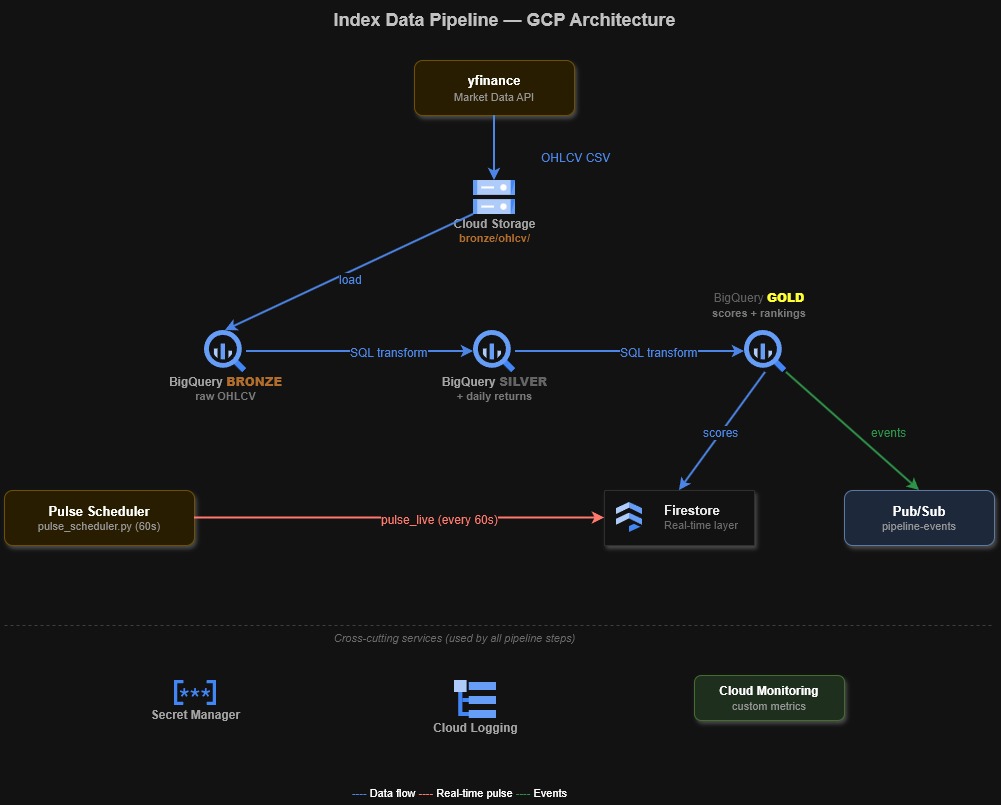
How the Pipeline Works
The index ETL pipeline moves market data through three layers — Bronze (raw), Silver (cleaned), Gold (scored) — using GCP-managed services at each stage. Secret Manager and Cloud Monitoring are cross-cutting concerns that apply throughout.
This diagram maps the Bronze-to-Gold service flow and the cross-cutting secret and monitoring dependencies.
flowchart TD
    SRC["yfinance<br/>OHLCV data"] -->|"CSV"| GCS["GCS<br/>Bronze Layer"]
    GCS -->|"load job"| BQ_B["BigQuery<br/>bronze_ohlcv"]
    BQ_B -->|"window fns"| BQ_S["BigQuery<br/>silver_ohlcv"]
    BQ_S -->|"scoring SQL"| BQ_G["BigQuery<br/>gold_scores"]
    BQ_G -->|"upsert"| FS["Firestore<br/>scores_latest"]
    BQ_G -->|"publish"| PS["Pub/Sub<br/>pipeline-events"]
    FS -->|"on_snapshot"| DASH["Dashboard<br/>live updates"]
    PS -->|"subscribe"| DASH
    SM["Secret Manager"] -.->|"credentials"| SRC
    SM -.->|"credentials"| GCS
    MON["Cloud Monitoring<br/>logs + metrics"] -.->|"observe"| BQ_G
Topics Covered
- Authentication & Setup
- Cloud Storage (GCS)
- BigQuery
- Pub/Sub
- Firestore (+ real-time listeners)
- Secret Manager
- Cloud Monitoring
Authentication & Setup
Pipeline role: The foundation — every GCP service call is authenticated via a service account key. The key file (JSON) is set via GOOGLE_APPLICATION_CREDENTIALS env var. All libraries auto-detect it.
Service Account (SA) — non-human identity with specific roles. GOOGLE_APPLICATION_CREDENTIALS env var points to the JSON key file — all google-cloud-* libraries auto-detect it via the ADC chain: env var → gcloud auth application-default login → GCE metadata server.
Imports and project constants
All google-cloud-* libraries follow the same pattern: import the service module and call Client(project=PROJECT_ID). No explicit credential initialization is needed — each client reads the ADC chain automatically on construction.
This snippet imports the GCP SDK modules and prints the shared project constants used throughout the note.
import io
import json
import os
import time
import threading
from datetime import datetime, timedelta

from google.api import metric_pb2
from google.cloud import bigquery, firestore, monitoring_v3, pubsub_v1, secretmanager, storage
from google.protobuf.timestamp_pb2 import Timestamp
import google.cloud.logging as cloud_logging
import pandas as pd
import yfinance as yf

PROJECT_ID = "index-lab-2"
REGION = "europe-west1"
BUCKET_NAME = f"{PROJECT_ID}-index-data"
BQ_DATASET = "index_data"

print(PROJECT_ID)
print(REGION)
print(BUCKET_NAME)
print(BQ_DATASET)
index-lab-2
europe-west1
index-lab-2-index-data
index_dataVerify credentials
GOOGLE_APPLICATION_CREDENTIALS must point to a service account JSON key file. If the env var is not set, each client falls back to the next step in the ADC chain. In a Cloud Run or GKE environment the metadata server provides credentials automatically — no key file needed.
This check prints the active ADC path, whether the file exists, and the target project metadata.
creds_path = os.environ.get('GOOGLE_APPLICATION_CREDENTIALS', 'NOT SET')
print(creds_path)                                                          # path
print(os.path.exists(creds_path) if creds_path != 'NOT SET' else False)   # file exists
print(PROJECT_ID)                                                          # project
print(REGION)                                                              # region
NOT SET
False
index-lab-2
europe-west1Cloud Storage (GCS)
Pipeline role: BRONZE LAYER — Raw data lands here first. yfinance OHLCV data is fetched and uploaded as CSV to gs://bucket/bronze/ohlcv/. GCS is the data lake — immutable, versioned, cheap storage. Downstream services (BigQuery, pipelines) read from here. For the CLI equivalents of these operations (gsutil cp, gcloud storage cp, lifecycle rules), see gcs-object-operations.
GCS organizes data into buckets (globally unique top-level containers) containing blobs (objects identified by path). Prefixes like bronze/, silver/, gold/ simulate a folder hierarchy. C# equivalent: Google.Cloud.Storage.V1 (StorageClient).
Fetch source data and upload to GCS
Create the GCS client and bucket reference
storage.Client(project=PROJECT_ID) authenticates via ADC and returns a project-scoped client. gcs.bucket(BUCKET_NAME) returns a local Bucket object — no network call is made until an operation is issued against it.
This snippet constructs the storage.Client and prints the bucket name and tracked ticker set.
gcs = storage.Client(project=PROJECT_ID)
bucket = gcs.bucket(BUCKET_NAME)
tickers = ["ASML.AS", "MC.PA", "SAP.DE", "SIE.DE", "TTE.PA"]

print(bucket.name)
print(tickers)
index-lab-2-index-data
['ASML.AS', 'MC.PA', 'SAP.DE', 'SIE.DE', 'TTE.PA']Fetch OHLCV data from yfinance
yf.Ticker(ticker).history() calls the Yahoo Finance API and returns a DataFrame with OHLCV columns. auto_adjust=False preserves both the Close and Adj Close columns — adjusted close accounts for splits and dividends, while raw close is used for index calculations.
This example downloads 90 days of OHLCV data and reports per-ticker row counts.
end_date = datetime.now()
start_date = end_date - timedelta(days=90)

all_data = []
for ticker in tickers:
    df = yf.Ticker(ticker).history(start=start_date, end=end_date, interval='1d', auto_adjust=False)
    if df.empty:
        print(f"  {ticker}: no data")
        continue
    df = df.reset_index()
    df['symbol'] = ticker
    df['Date'] = df['Date'].dt.strftime('%Y-%m-%d')
    all_data.append(df)
    print(f"  {ticker}: {len(df)} rows")

ohlcv_df = pd.concat(all_data, ignore_index=True)
print(f"\nTotal: {len(ohlcv_df)} rows")
ASML.AS: 62 rows
MC.PA: 62 rows
SAP.DE: 60 rows
SIE.DE: 60 rows
TTE.PA: 62 rows
Total: 306 rowsUpload a CSV to GCS
blob.upload_from_string(data, content_type) writes bytes or a string directly to GCS — no temp file needed. The blob path (bronze/ohlcv/YYYYMMDD_ohlcv.csv) follows the Hive-style partition convention for BigQuery compatibility.
This example uploads the in-memory CSV payload to the Bronze prefix in GCS.
csv_buffer = ohlcv_df.to_csv(index=False)
blob_path = f"bronze/ohlcv/{datetime.now().strftime('%Y%m%d')}_ohlcv.csv"
bucket.blob(blob_path).upload_from_string(csv_buffer, content_type='text/csv')
print(f"  Uploaded: gs://{BUCKET_NAME}/{blob_path} ({len(csv_buffer):,} bytes)")
Uploaded: gs://index-lab-2-index-data/bronze/ohlcv/20260322_ohlcv.csv (35,426 bytes)Object operations
List objects in a prefix
gcs.list_blobs(bucket, prefix) returns a lazy iterator of Blob objects — it pages through results automatically. Passing max_results caps the response for preview purposes.
This example lists the first objects under the Bronze prefix with their byte sizes.
for blob in gcs.list_blobs(BUCKET_NAME, prefix="bronze/", max_results=10):
    print(f"  {blob.name:50s} {blob.size or 0:>10,} bytes")
bronze/.keep 0 bytes
bronze/ohlcv/20260322_ohlcv.csv 35,426 bytesDownload an object and read as DataFrame
bucket.blob(path).download_as_text() fetches the object content as a UTF-8 string. Wrapping in io.StringIO lets pd.read_csv parse it without writing to disk.
This example downloads the uploaded CSV and verifies the DataFrame shape and symbol set.
downloaded = bucket.blob(blob_path).download_as_text()
df_check = pd.read_csv(io.StringIO(downloaded))
print(f"  Downloaded: {len(df_check)} rows, {len(df_check.columns)} columns")
print(list(df_check.columns))
print(sorted(df_check["symbol"].unique()))
Downloaded: 306 rows, 10 columns
['Date', 'Open', 'High', 'Low', 'Close', 'Adj Close', 'Volume', 'Dividends', 'Stock Splits', 'symbol']
['ASML.AS', 'MC.PA', 'SAP.DE', 'SIE.DE', 'TTE.PA']BigQuery
Pipeline role: SILVER + GOLD LAYERS — The analytics engine. Bronze data is loaded from GCS into BigQuery tables. SQL transforms compute daily returns (silver) and composite scores (gold). BigQuery handles petabyte-scale data with serverless SQL — no infrastructure to manage.
A dataset is a container for tables (like a schema in SQL Server). Tables use columnar storage with partitioning and clustering for performance. Data is loaded via load jobs (from GCS, DataFrames, or JSONL) and queried with standard SQL on Google’s distributed engine. C# equivalent: Google.Cloud.BigQuery.V2 (BigQueryClient).
Python shows the full ETL; C# shows read-only queries
This notebook runs the complete pipeline: load → silver transform → gold transform → query. The C# notebook reads from tables already populated by this run. In a production C# service,
BigQueryClient.CreateLoadJob()andCreateQueryJob()handle these same operations.
Load data into BigQuery
Create the BigQuery client
bigquery.Client(project=PROJECT_ID) authenticates via ADC. All load jobs and queries go through this single client instance.
This snippet constructs the shared bigquery.Client and prints the resolved project ID.
bq = bigquery.Client(project=PROJECT_ID)
print(bq.project)index-lab-2Load a DataFrame into the bronze table
load_table_from_dataframe(df, table_id, job_config) converts the DataFrame to Parquet internally and submits a load job. WRITE_TRUNCATE replaces all existing data — use WRITE_APPEND to add rows. Calling job.result() blocks until the job completes. BigQuery partitioning requires the date column to be a Python datetime.date object, not a string.
This example normalizes the DataFrame schema, adds ingestion metadata, and loads the Bronze table.
load_df = ohlcv_df.rename(columns={
    'Date': 'date', 'Open': 'open', 'High': 'high', 'Low': 'low',
    'Close': 'close', 'Adj Close': 'adj_close', 'Volume': 'volume',
    'Dividends': 'dividends', 'Stock Splits': 'stock_splits',
})
load_df['date'] = pd.to_datetime(load_df['date']).dt.date
load_df['_ingested_at'] = datetime.now(tz=__import__('datetime').timezone.utc)
load_df = load_df[['symbol', 'date', 'open', 'high', 'low', 'close', 'adj_close',
                   'volume', 'dividends', 'stock_splits', '_ingested_at']]

table_id = f'{PROJECT_ID}.{BQ_DATASET}.bronze_ohlcv'
job = bq.load_table_from_dataframe(
    load_df, table_id,
    job_config=bigquery.LoadJobConfig(write_disposition='WRITE_TRUNCATE')
)
job.result()
print(f"  Loaded {job.output_rows} rows into {table_id}")
Loaded 306 rows into index-lab-2.index_data.bronze_ohlcvTransform with SQL
Bronze → Silver: compute daily returns
bq.query(sql, job_config) submits an asynchronous query job. Setting destination in QueryJobConfig writes results directly to a table. The LAG window function computes the previous day’s close per ticker, and SAFE_DIVIDE avoids division-by-zero on the first row of each partition.
This query materializes daily returns into the Silver table with window functions.
silver_sql = f'''
    SELECT *,
        SAFE_DIVIDE(close - LAG(close) OVER (PARTITION BY symbol ORDER BY date),
                    LAG(close) OVER (PARTITION BY symbol ORDER BY date)) AS daily_return,
        FALSE AS is_filled
    FROM `{PROJECT_ID}.{BQ_DATASET}.bronze_ohlcv`
'''

silver_table = f'{PROJECT_ID}.{BQ_DATASET}.silver_ohlcv'
job = bq.query(silver_sql, job_config=bigquery.QueryJobConfig(
    destination=silver_table, write_disposition='WRITE_TRUNCATE'
))
job.result()
print(f"  Silver table: {bq.get_table(silver_table).num_rows} rows")
Silver table: 306 rowsSilver → Gold: compute momentum scores and rankings
This query uses a CTE to compute rolling 30-day moving averages and volatility, then selects only the latest row per ticker (rn = 1). RANK() orders tickers by momentum score descending — rank 1 is the strongest momentum.
This query computes rolling features, scores momentum, and writes the Gold table.
gold_sql = f'''
    WITH latest AS (
        SELECT symbol, date AS score_date, close, daily_return, volume,
            AVG(close) OVER (PARTITION BY symbol ORDER BY date ROWS BETWEEN 29 PRECEDING AND CURRENT ROW) AS sma_30,
            STDDEV(daily_return) OVER (PARTITION BY symbol ORDER BY date ROWS BETWEEN 29 PRECEDING AND CURRENT ROW) AS volatility_30d,
            AVG(CAST(volume AS FLOAT64)) OVER (PARTITION BY symbol ORDER BY date ROWS BETWEEN 9 PRECEDING AND CURRENT ROW) AS avg_volume_10d,
            ROW_NUMBER() OVER (PARTITION BY symbol ORDER BY date DESC) AS rn
        FROM `{PROJECT_ID}.{BQ_DATASET}.silver_ohlcv`
    )
    SELECT symbol, score_date, close, daily_return,
        volatility_30d, avg_volume_10d,
        SAFE_DIVIDE(close - sma_30, sma_30) AS momentum_score,
        SAFE_DIVIDE(CAST(volume AS FLOAT64), avg_volume_10d) AS volume_score,
        RANK() OVER (ORDER BY SAFE_DIVIDE(close - sma_30, sma_30) DESC) AS composite_rank,
        CURRENT_TIMESTAMP() AS _scored_at
    FROM latest WHERE rn = 1
'''

gold_table = f'{PROJECT_ID}.{BQ_DATASET}.gold_scores'
job = bq.query(gold_sql, job_config=bigquery.QueryJobConfig(
    destination=gold_table, write_disposition='WRITE_TRUNCATE'
))
job.result()
print(f"  Gold scores: {bq.get_table(gold_table).num_rows} rows")
Gold scores: 5 rowsQuery and display gold scores
bq.query(sql) without a job_config runs a standard read query. Iterating the result returns Row objects with named attribute access (row.symbol, row.close).
This query reads the ranked Gold rows back for inspection.
results = bq.query(f'''
    SELECT symbol, score_date, ROUND(close, 2) AS close,
        ROUND(momentum_score * 100, 2) AS momentum_pct,
        ROUND(volume_score, 2) AS vol_ratio,
        composite_rank
    FROM `{gold_table}` ORDER BY composite_rank
''')
for row in results:
    print(f"  {row.composite_rank:>2d}. {row.symbol:10s} close={row.close:>8.2f}  momentum={row.momentum_pct:>+6.2f}%  vol_ratio={row.vol_ratio:.2f}")
1. TTE.PA close= 76.96 momentum=+12.82% vol_ratio=1.61
2. ASML.AS close= 1128.20 momentum= -6.15% vol_ratio=3.01
3. SAP.DE close= 153.82 momentum= -8.70% vol_ratio=2.84
4. MC.PA close= 457.95 momentum=-10.90% vol_ratio=1.97
5. SIE.DE close= 203.75 momentum=-13.24% vol_ratio=2.33Pub/Sub
Pipeline role: EVENT BUS — Decouples pipeline steps. After each ETL stage completes, a message is published (“ohlcv_loaded”, “silver_computed”, “gold_scored”). Downstream consumers (dashboards, alerting, other pipelines) subscribe to these events. Enables async, event-driven architecture. For topic/subscription management and dead-letter configuration via gcloud, see pubsub-messaging.
Messages are published to topics (named channels) and consumed via subscriptions (pull or push). Each message carries a bytes payload plus optional string attributes as metadata. Messages must be acknowledged after processing — unacknowledged messages are redelivered after the ack deadline. C# equivalent: Google.Cloud.PubSub.V1 (PublisherClient, SubscriberClient).
Publish and pull messages
Publish pipeline events to a topic
publisher.publish(topic_path, data, **attributes) submits a message and returns a Future. Calling .result() blocks until the server confirms delivery and returns the message ID. Extra keyword arguments become string attributes on the message — useful for routing and filtering by downstream subscribers.
This example publishes pipeline milestones with Pub/Sub attributes and prints the server-assigned message IDs.
TOPIC = "pipeline-events"
SUBSCRIPTION = "pipeline-events-sub"

publisher = pubsub_v1.PublisherClient()
subscriber = pubsub_v1.SubscriberClient()
topic_path = publisher.topic_path(PROJECT_ID, TOPIC)
sub_path = subscriber.subscription_path(PROJECT_ID, SUBSCRIPTION)

events = [
    {"event": "ohlcv_loaded", "table": "bronze_ohlcv", "rows": len(ohlcv_df), "tickers": tickers},
    {"event": "silver_computed", "table": "silver_ohlcv", "status": "success"},
    {"event": "gold_scored", "table": "gold_scores", "status": "success"},
]

for event in events:
    data = json.dumps(event).encode('utf-8')
    future = publisher.publish(topic_path, data, source='notebook', pipeline='index_etl')
    msg_id = future.result()
    print(f"  Published: {event['event']} (msg_id={msg_id})")

time.sleep(2)  # allow messages to propagate
Published: ohlcv_loaded (msg_id=18105666298433432)
Published: silver_computed (msg_id=18105683355927302)
Published: gold_scored (msg_id=18105673114676996)Pull and acknowledge messages
subscriber.pull(request={...}) performs a synchronous batch pull — suited for notebooks and batch scripts. In production services use the streaming subscriber.subscribe(subscription, callback) for continuous delivery. Unacknowledged messages are redelivered after the ack deadline (default 60 seconds).
This example pulls the published events and acknowledges the received ack_id values.
response = subscriber.pull(request={'subscription': sub_path, 'max_messages': 10})

ack_ids = []
for msg in response.received_messages:
    data = json.loads(msg.message.data.decode('utf-8'))
    attrs = dict(msg.message.attributes)
    print(f"  [{msg.message.publish_time.strftime('%H:%M:%S')}] {data['event']:20s} | attrs={attrs}")
    ack_ids.append(msg.ack_id)

if ack_ids:
    subscriber.acknowledge(request={'subscription': sub_path, 'ack_ids': ack_ids})
    print(f"\n  Acknowledged {len(ack_ids)} messages")
else:
    print("  No messages to pull")
[13:48:15] ohlcv_loaded | attrs={'pipeline': 'index_etl', 'source': 'notebook'}
[13:48:16] silver_computed | attrs={'pipeline': 'index_etl', 'source': 'notebook'}
[13:48:16] gold_scored | attrs={'pipeline': 'index_etl', 'source': 'notebook'}
Acknowledged 3 messagesFirestore
Pipeline role: REAL-TIME LAYER — The live dashboard backend. Gold scores and pulse snapshots are written here for low-latency reads. Firestore supports real-time listeners, so dashboards receive change notifications without polling.
Data is organized into collections (groups of documents, like tables) containing documents (JSON-like records with fields, like rows). Documents can have subcollections for nested hierarchies. In this pipeline, the distinguishing capability is the on_snapshot listener, which streams document changes to clients. C# equivalent: Google.Cloud.Firestore (FirestoreDb).
Python has true push listener; C# uses REST polling
Python’s
collection.on_snapshot(callback)registers a gRPC stream that fires instantly on every document change — no polling required. The C# notebook uses a REST polling loop as a workaround for a .NET 10 Interactive SDK compatibility issue. In a .NET 8/9 project,FirestoreDb.Collection().Listen()provides equivalent push behavior.
Write and read documents
Batch write gold scores to Firestore
db.batch() creates a write batch that buffers set, update, and delete operations. batch.commit() sends all operations in a single network round-trip — more efficient than individual writes for bulk updates. batch.set(doc_ref, data) upserts the document.
This example upserts the ranked Gold records into the scores_latest collection.
db = firestore.Client(project=PROJECT_ID)
bq = bigquery.Client(project=PROJECT_ID)

results = bq.query(f'SELECT * FROM `{PROJECT_ID}.{BQ_DATASET}.gold_scores` ORDER BY composite_rank')

batch = db.batch()
count = 0
for row in results:
    doc_ref = db.collection('scores_latest').document(row.symbol)
    batch.set(doc_ref, {
        'symbol': row.symbol,
        'close': row.close,
        'daily_return': row.daily_return,
        'momentum_score': row.momentum_score,
        'volume_score': row.volume_score,
        'composite_rank': row.composite_rank,
        'updated_at': datetime.now(tz=__import__("datetime").timezone.utc),
    })
    count += 1

batch.commit()
print(f"  Written {count} scores to Firestore (scores_latest collection)")
Written 5 scores to Firestore (scores_latest collection)Read a collection with stream()
db.collection('name').stream() fetches all documents in the collection as a lazy iterator. doc.to_dict() converts the Firestore document fields to a plain Python dict.
This example streams the pulse_live collection and prints the current snapshot.
docs = db.collection('pulse_live').stream()
pulse_count = 0
for doc in docs:
    d = doc.to_dict() or {}
    price = d.get('current_price', 'N/A')
    chg_pct = d.get('price_change_pct')
    vol_ratio = d.get('volume_ratio')
    ts = d.get('timestamp', '')
    print(f"  {doc.id:10s}  price={price:>10}  change={f'{chg_pct:+.2f}%' if chg_pct else 'N/A':>8s}  "
          f"vol_ratio={f'{vol_ratio:.2f}' if vol_ratio else 'N/A':>6s}  ts={ts[-8:]}")
    pulse_count += 1

if pulse_count == 0:
    print('  No pulse data yet. Run: python pulse_scheduler.py --once')
ASML.AS price= 1128.2 change= -3.46% vol_ratio= 3.01 ts=03+00:00
MC.PA price= 457.95 change= -0.50% vol_ratio= 1.97 ts=59+00:00
SAP.DE price= 153.82 change= -3.86% vol_ratio= 2.84 ts=74+00:00
SIE.DE price= 203.75 change= -3.11% vol_ratio= 2.33 ts=01+00:00
TTE.PA price= 76.96 change= -2.07% vol_ratio= 1.61 ts=45+00:00Subscribe to real-time changes
Register an on_snapshot listener
collection.on_snapshot(callback) opens a persistent gRPC stream to Firestore. The callback fires immediately with the current state (change type ADDED for every existing document), then fires again on every subsequent change (MODIFIED, REMOVED). Call listener.unsubscribe() to release the stream.
Run pulse_scheduler.py first
Run
pulse_scheduler.py --minutes 5in a separate terminal before starting this cell. The scheduler writes topulse_liveevery 60 seconds, which triggersMODIFIEDevents in the listener.
This example attaches an on_snapshot listener and reports the mix of ADDED and MODIFIED events.
db = firestore.Client(project=PROJECT_ID)
events_received = []

def on_snapshot(doc_snapshot, changes, read_time):
    for change in changes:
        doc = change.document
        d = doc.to_dict() or {}
        change_type = change.type.name  # ADDED, MODIFIED, REMOVED
        price = d.get('current_price', 'N/A')
        chg_pct = d.get('price_change_pct')
        ts = d.get('timestamp', '')[-8:]
        events_received.append({'symbol': doc.id, 'type': change_type, 'price': price})
        print(f"  [{change_type:8s}] {doc.id:10s}  price={price:>10}  "
              f"change={f'{chg_pct:+.2f}%' if chg_pct else 'N/A':>8s}  ts={ts}")

print('Listening to pulse_live collection...')
print('(Run pulse_scheduler.py in another terminal to see live updates)\n')

listener = db.collection('pulse_live').on_snapshot(on_snapshot)

LISTEN_SECONDS = 120
print(f'Listening for {LISTEN_SECONDS}s...\n')
time.sleep(LISTEN_SECONDS)

listener.unsubscribe()
print(f'\nListener stopped. Total events received: {len(events_received)}')

if events_received:
    from collections import Counter
    type_counts = Counter(e['type'] for e in events_received)
    print(f'  ADDED:    {type_counts.get("ADDED", 0)} (initial state)')
    print(f'  MODIFIED: {type_counts.get("MODIFIED", 0)} (live updates from scheduler)')
    print(f'  REMOVED:  {type_counts.get("REMOVED", 0)}')
Listening to pulse_live collection...
(Run pulse_scheduler.py in another terminal to see live updates)
Listening for 120s...
[ADDED ] ASML.AS price= 1128.2 change= -3.46% ts=03+00:00
[ADDED ] MC.PA price= 457.95 change= -0.50% ts=59+00:00
[ADDED ] SAP.DE price= 153.82 change= -3.86% ts=74+00:00
[ADDED ] SIE.DE price= 203.75 change= -3.11% ts=01+00:00
[ADDED ] TTE.PA price= 76.96 change= -2.07% ts=45+00:00
[MODIFIED] ASML.AS price= 1128.2 change= -3.46% ts=13+00:00
[MODIFIED] MC.PA price= 457.95 change= -0.50% ts=43+00:00
[MODIFIED] SAP.DE price= 153.82 change= -3.86% ts=69+00:00
[MODIFIED] SIE.DE price= 203.75 change= -3.11% ts=16+00:00
[MODIFIED] TTE.PA price= 76.96 change= -2.07% ts=56+00:00
[MODIFIED] ASML.AS price= 1128.2 change= -3.46% ts=66+00:00
[MODIFIED] MC.PA price= 457.95 change= -0.50% ts=59+00:00
[MODIFIED] SAP.DE price= 153.82 change= -3.86% ts=59+00:00
[MODIFIED] SIE.DE price= 203.75 change= -3.11% ts=10+00:00
[MODIFIED] TTE.PA price= 76.96 change= -2.07% ts=78+00:00
Listener stopped. Total events received: 15
ADDED: 5 (initial state)
MODIFIED: 10 (live updates from scheduler)
REMOVED: 0Secret Manager
Pipeline role: CREDENTIAL VAULT — All secrets (DB passwords, API keys, connection strings) live here. Pipeline code retrieves them at runtime — never hardcoded, never in git. Supports versioning and rotation. In production, Cloud Run and GKE inject secrets automatically. For the broader secrets management strategy including rotation policies and workload identity, see secrets-management.
A secret is a named container for sensitive data. Each update creates a new immutable version — old versions can be disabled or destroyed for rotation. Secrets are retrieved at runtime via access calls (latest or specific version). C# equivalent: Google.Cloud.SecretManager.V1 (SecretManagerServiceClient).
Python shows full secret lifecycle; C# shows read and list only
This notebook demonstrates create, add version, read, list, and delete. The C# notebook covers read and list. The API structure is identical in both languages — use
CreateSecret,AddSecretVersion, andDeleteSecretin C# for the same lifecycle operations.
Read and list secrets
Read the latest version of a secret
sm.access_secret_version(request={'name': name}) fetches the payload for a specific version. Using versions/latest always retrieves the current active version. The payload is bytes — decode with .decode('utf-8'). Never print or log raw secret values in production.
This example reads the latest secret versions and prints masked values only.
sm = secretmanager.SecretManagerServiceClient()

for secret_id in ['index-db-password', 'index-api-key']:
    name = f'projects/{PROJECT_ID}/secrets/{secret_id}/versions/latest'
    response = sm.access_secret_version(request={'name': name})
    value = response.payload.data.decode('utf-8')
    masked = value[:3] + '*' * (len(value) - 3)
    print(f"  {secret_id}: {masked}")
index-db-password: Esg************
index-api-key: dem***************Manage secret lifecycle
Create a secret and add a version
create_secret creates the named container. The value is stored separately via add_secret_version — this separation allows rotating values without changing the secret name. Each version is immutable; old versions can be disabled or destroyed for rotation.
This example creates a demo secret, appends a new version, and reads it back.
parent = f'projects/{PROJECT_ID}'
try:
    sm.create_secret(request={
        'parent': parent,
        'secret_id': 'index-notebook-demo',
        'secret': {'replication': {'automatic': {}}},
    })
    print('  Created secret: index-notebook-demo')
except Exception as e:
    if 'ALREADY_EXISTS' in str(e):
        print('  Secret already exists: index-notebook-demo')

sm.add_secret_version(request={
    'parent': f'{parent}/secrets/index-notebook-demo',
    'payload': {'data': b'my-secret-value-v1'},
})
print('  Added version 1')

resp = sm.access_secret_version(request={
    'name': f'{parent}/secrets/index-notebook-demo/versions/latest'
})
print(f'  Value: {resp.payload.data.decode()}')
Created secret: index-notebook-demo
Added version 1
Value: my-secret-value-v1List all secrets and delete a secret
list_secrets returns a paginated iterator of Secret resource objects. The full resource name has the format projects/{project}/secrets/{id} — split on / to extract the ID. delete_secret removes the container and all its versions permanently.
This example lists visible secrets and then deletes the demo secret.
for secret in sm.list_secrets(request={'parent': parent}):
    print(f'  {secret.name.split("/")[-1]}')

sm.delete_secret(request={'name': f'{parent}/secrets/index-notebook-demo'})
print('\n  Deleted: index-notebook-demo')
index-api-key
index-db-password
index-notebook-demo
Deleted: index-notebook-demoCloud Monitoring
Pipeline role: OBSERVABILITY — Two components: Cloud Logging (structured log entries for every pipeline event) and Cloud Monitoring (custom metrics for quantitative KPIs). Enables alerting (“pipeline failed”, “row count dropped 50%”), dashboards, and post-mortem debugging.
Cloud Logging writes structured log entries queryable in Log Explorer. Custom metrics write time series data (row counts, latency, errors) viewable in Metrics Explorer. Alerts trigger notifications when metrics cross thresholds. C# equivalent for metrics: Google.Cloud.Monitoring.V3 (MetricServiceClient); for logging: Google.Cloud.Logging.V2 (LoggingServiceV2Client).
Python covers Cloud Logging; C# covers custom metrics only
This notebook demonstrates both Cloud Logging (
log_struct) and custom metrics. The C# notebook focuses on custom metrics — the Cloud Logging C# equivalent usesLoggingServiceV2Client.WriteLogEntries()with the same structured payload pattern.
Write structured logs
Log pipeline events to Cloud Logging
logger.log_struct(data, severity) writes a JSON-structured log entry to the named log stream. Entries are queryable in Log Explorer by logName, severity, timestamp, and any field in the JSON payload. Valid severity values: DEBUG, INFO, WARNING, ERROR, CRITICAL.
This example writes two structured JSON events to Cloud Logging.
log_client = cloud_logging.Client(project=PROJECT_ID)
logger = log_client.logger('index-pipeline')

logger.log_struct({
    'event': 'pipeline_completed',
    'rows_loaded': len(ohlcv_df),
    'tickers': tickers,
    'status': 'success',
}, severity='INFO')
print("  Wrote INFO log: pipeline_completed")

logger.log_struct({
    'event': 'scores_computed',
    'table': 'gold_scores',
    'rows': 5,
}, severity='INFO')
print("  Wrote INFO log: scores_computed")
Wrote INFO log: pipeline_completed
Wrote INFO log: scores_computedWrite custom metrics
Register a metric descriptor
Before writing data points, register the metric type with create_metric_descriptor. This is idempotent — subsequent calls with the same type return ALREADY_EXISTS. The descriptor defines the metric kind (GAUGE for point-in-time values, CUMULATIVE for counters) and the value type (INT64, DOUBLE, etc.).
This example registers the custom metric descriptor for pipeline row counts.
metric_client = monitoring_v3.MetricServiceClient()
project_name = f'projects/{PROJECT_ID}'

descriptor = metric_pb2.MetricDescriptor()
descriptor.type = "custom.googleapis.com/index_pipeline/rows_loaded"
descriptor.metric_kind = metric_pb2.MetricDescriptor.MetricKind.GAUGE
descriptor.value_type = metric_pb2.MetricDescriptor.ValueType.INT64
descriptor.description = "Number of OHLCV rows loaded per pipeline run"

try:
    metric_client.create_metric_descriptor(
        request={'name': project_name, 'metric_descriptor': descriptor}
    )
    print("  Created metric: custom.googleapis.com/index_pipeline/rows_loaded")
except Exception as e:
    if 'ALREADY_EXISTS' in str(e):
        print("  Metric already exists")
    else:
        print(f'  {e}')
Created metric: custom.googleapis.com/index_pipeline/rows_loadedWrite a data point to a custom metric
create_time_series writes one or more time series points. The TimeSeries object specifies the metric type and monitored resource, and the Point carries the timestamp interval and value. Data appears in Metrics Explorer within ~60 seconds.
This example emits a single rows_loaded data point and prints the related console URLs.
now = time.time()
interval = monitoring_v3.TimeInterval(
    {'end_time': {'seconds': int(now), 'nanos': int((now % 1) * 1e9)}})
point = monitoring_v3.Point({'interval': interval, 'value': {'int64_value': len(ohlcv_df)}})

series = monitoring_v3.TimeSeries()
series.metric.type = "custom.googleapis.com/index_pipeline/rows_loaded"
series.resource.type = "global"
series.points = [point]

metric_client.create_time_series(request={'name': project_name, 'time_series': [series]})
print(f"  Wrote metric: rows_loaded = {len(ohlcv_df)}")
print(f"  Logs:    https://console.cloud.google.com/logs?project={PROJECT_ID}")
print(f"  Metrics: https://console.cloud.google.com/monitoring/metrics-explorer?project={PROJECT_ID}")
Wrote metric: rows_loaded = 306
Logs: https://console.cloud.google.com/logs?project=index-lab-2
Metrics: https://console.cloud.google.com/monitoring/metrics-explorer?project=index-lab-2Summary
GCP Python Quick Reference
Service Pattern Description Auth os.environ['GOOGLE_APPLICATION_CREDENTIALS']Service account key Auth Client(project=PROJECT_ID)All libraries use this GCS storage.Client()Create client GCS bucket.blob(path).upload_from_string(data)Upload GCS bucket.blob(path).download_as_text()Download GCS client.list_blobs(bucket, prefix=...)List objects BigQuery client.load_table_from_dataframe(df, table)Load DataFrame BigQuery client.query(sql)Run SQL query BigQuery job.result()Wait for completion Pub/Sub publisher.publish(topic, data, **attrs)Publish message Pub/Sub subscriber.pull(subscription, max_messages)Pull messages Firestore db.collection('name').document('id').set({})Write document Firestore db.collection('name').stream()Read all docs Firestore db.batch()Batch writes Secrets sm.access_secret_version(name)Read secret Monitoring logger.log_struct({...}, severity='INFO')Structured log C# equivalents:
google-cloud-storage→Google.Cloud.Storage.V1|google-cloud-bigquery→Google.Cloud.BigQuery.V2|google-cloud-pubsub→Google.Cloud.PubSub.V1|google-cloud-firestore→Google.Cloud.Firestore|google-cloud-secret-mgr→Google.Cloud.SecretManager.V1
Python GCP Warnings
BigQuery charges by bytes scanned, not query time
SELECT *on a 1TB table scans the entire table and bills accordingly, even if you only need two columns.
Correct pattern
Always select only needed columns:
SELECT symbol, close FROM .... Use partitioned/clustered tables to limit scan scope.
Pub/Sub messages are at-least-once delivery
The same message may be delivered more than once. Processing it twice causes duplicate records, double charges, or corrupted state.
Correct pattern
Design consumers to be idempotent — use
message_idor a business key for deduplication.
Never commit secrets to git
Credentials committed to source control are a common cause of avoidable cloud security incidents.
Correct pattern
Use GCP Secret Manager in production. Use
.envfiles locally with.gitignore. Never bake secrets into container images.
Python GCP Recommendations
Authentication and access
Prefer ADC over static service-account keys
ADC keeps the same client construction path across local development and managed runtimes. Use gcloud auth application-default login for workstation auth, and rely on the metadata server in Cloud Run, GKE, or Compute Engine.
This snippet summarizes the preferred credential source by runtime.
credential_sources = {
    "local_dev": "gcloud auth application-default login",
    "cloud_run": "metadata server",
}
for runtime, source in credential_sources.items():
    print(f"  {runtime}: {source}")
local_dev: gcloud auth application-default login
cloud_run: metadata serverScope IAM roles to the service boundary
Assign only the IAM roles each workload needs. For this pipeline, separate BigQuery, Cloud Storage, and Secret Manager permissions instead of granting broad project-wide access.
This snippet lists the minimum role set commonly needed by the sample pipeline.
recommended_roles = {
    "bigquery_writer": "roles/bigquery.dataEditor",
    "gcs_writer": "roles/storage.objectAdmin",
    "secret_reader": "roles/secretmanager.secretAccessor",
}
for workload, role in recommended_roles.items():
    print(f"  {workload}: {role}")
bigquery_writer: roles/bigquery.dataEditor
gcs_writer: roles/storage.objectAdmin
secret_reader: roles/secretmanager.secretAccessorResolve Secret Manager values at runtime
Keep Secret Manager access inside the request, job, or pipeline execution path so rotation takes effect without a redeploy. Avoid module-level secret fetches and never log raw secret material.
This snippet shows the runtime-only secret reference pattern.
secret_ref = "projects/index-lab-2/secrets/index-api-key/versions/latest"
print("  resolve inside job execution")
print(f"  {secret_ref}")
resolve inside job execution
projects/index-lab-2/secrets/index-api-key/versions/latestData pipeline behavior
Partition BigQuery tables by date
Use PARTITION BY date and cluster high-cardinality filters such as symbol so BigQuery scans only the slices needed for a query. This is the primary control for query cost and latency in the Silver and Gold layers.
This snippet prints the preferred table layout for the OHLCV tables.
layout = {"partition_field": "date", "cluster_fields": ["symbol"]}
print(f"  PARTITION BY {layout['partition_field']}")
print(f"  CLUSTER BY {', '.join(layout['cluster_fields'])}")
PARTITION BY date
CLUSTER BY symbolPrefer structured Cloud Logging entries
Emit logger.log_struct(...) payloads instead of unstructured print() output when the event should be searchable, alertable, or correlated with metrics. Structured fields make Log Explorer filters and alert policies reliable.
This snippet shows the event fields worth preserving in a structured log entry.
events = [
    {"severity": "INFO", "event": "pipeline_completed"},
    {"severity": "ERROR", "event": "publish_failed"},
]
for event in events:
    print(f"  {event['severity']}: {event['event']}")
INFO: pipeline_completed
ERROR: publish_failedBatch Firestore writes and make Pub/Sub handlers idempotent
Use db.batch() for grouped writes and deduplicate Pub/Sub work with message_id or a business key. The pipeline assumes at-least-once delivery, so repeated messages must be safe to replay.
This snippet highlights the two controls that prevent duplicate side effects.
controls = {
    "firestore_batch_limit": 500,
    "pubsub_dedup_key": "message_id",
}
for name, value in controls.items():
    print(f"  {name}: {value}")
firestore_batch_limit: 500
pubsub_dedup_key: message_idPython GCP Troubleshooting
Authentication and authorization
Diagnose DefaultCredentialsError
A DefaultCredentialsError means the ADC chain found neither GOOGLE_APPLICATION_CREDENTIALS, nor cached gcloud application-default credentials, nor a metadata server. Confirm each source in that order.
This snippet prints the first credential checks to run on a workstation.
checks = [
    "echo $GOOGLE_APPLICATION_CREDENTIALS",
    "gcloud auth application-default print-access-token",
    "gcloud config get-value project",
]
for check in checks:
    print(f"  {check}")
echo $GOOGLE_APPLICATION_CREDENTIALS
gcloud auth application-default print-access-token
gcloud config get-value projectDiagnose PermissionDenied for Secret Manager or Cloud Storage
A PermissionDenied or 403 on Secret Manager or Cloud Storage usually means the workload identity lacks the exact IAM binding on the project, bucket, or secret. Check the effective principal before changing code.
This snippet lists the roles that commonly resolve access failures in this note.
required_roles = [
    "roles/secretmanager.secretAccessor",
    "roles/storage.objectAdmin",
]
for role in required_roles:
    print(f"  {role}")
roles/secretmanager.secretAccessor
roles/storage.objectAdminQuery and message processing
Diagnose expensive BigQuery scans
If a query is unexpectedly expensive, inspect whether it uses SELECT * or misses the date partition filter. Cost in BigQuery follows bytes scanned, not wall-clock execution time.
This snippet contrasts the risky and preferred query shapes.
queries = [
    "SELECT * FROM bronze_ohlcv",
    "SELECT symbol, close FROM bronze_ohlcv WHERE date >= '2026-03-01'",
]
for query in queries:
    print(f"  {query}")
SELECT * FROM bronze_ohlcv
SELECT symbol, close FROM bronze_ohlcv WHERE date >= '2026-03-01'Diagnose duplicate Pub/Sub delivery
Repeated Pub/Sub messages are expected under at-least-once delivery. Treat duplicates as a consumer-design issue: ack only after successful processing and deduplicate on message_id or an application key.
This snippet prints the duplicate-handling order used by resilient subscribers.
steps = ["process message", "persist idempotency key", "ack message"]
for index, step in enumerate(steps, start=1):
    print(f"  {index}. {step}")
1. process message
2. persist idempotency key
3. ack messageDocument and object storage
Diagnose oversized Firestore documents
A failed Firestore write near the 1 MB document limit usually means high-volume fields belong in a subcollection or an object store. Keep hot documents small and push large payloads to GCS.
This snippet prints the two remediation options when a document approaches the size limit.
actions = [
    "move large arrays into a subcollection",
    "store binary payloads in GCS and keep only the URI in Firestore",
]
for action in actions:
    print(f"  {action}")
move large arrays into a subcollection
store binary payloads in GCS and keep only the URI in FirestoreDiagnose Cloud Storage 403 Forbidden
A 403 Forbidden on Cloud Storage usually points to missing bucket-level or project-level IAM, not to a malformed blob path. Verify the bucket name, then confirm the active principal has the expected storage role.
This snippet shows the first identifiers to compare when a bucket access check fails.
diagnostics = {
    "bucket": "index-lab-2-index-data",
    "role": "roles/storage.objectAdmin",
}
for key, value in diagnostics.items():
    print(f"  {key}: {value}")
bucket: index-lab-2-index-data
role: roles/storage.objectAdmin